
Have you ever needed to check your EPF details, download a government document or use a government service but had to search for a different website every time? This can become confusing, especially when you are not sure which department’s portal to visit.
The UMANG app makes this process easier by bringing many Central Government, State Government and other public services together in one place.
If you are using UMANG for the first time, you need to complete UMANG new registration before accessing your personal account. The process is quite simple. You mainly need a working mobile number, access to the OTP and a few minutes to set up your account.
In this guide, I will explain how to complete UMANG new user registration, create your MPIN, log in for the first time and find the services you need.
UMANG Registration 2026 – Quick Details
| Details | Information |
|---|---|
| App name | UMANG |
| Full form | Unified Mobile Application for New-age Governance |
| Developed by | National e-Governance Division (NeGD) |
| Ministry | Ministry of Electronics and Information Technology |
| Registration mode | Online |
| Registration requirement | Mobile number and OTP |
| Login options | MPIN, OTP and supported DigiLocker/MeriPehchaan login |
| Available platforms | Android, iOS and Web |
| Registration charges | Free |
| Official website | https://web.umang.gov.in/ |
UMANG New Registration – Direct Official Link
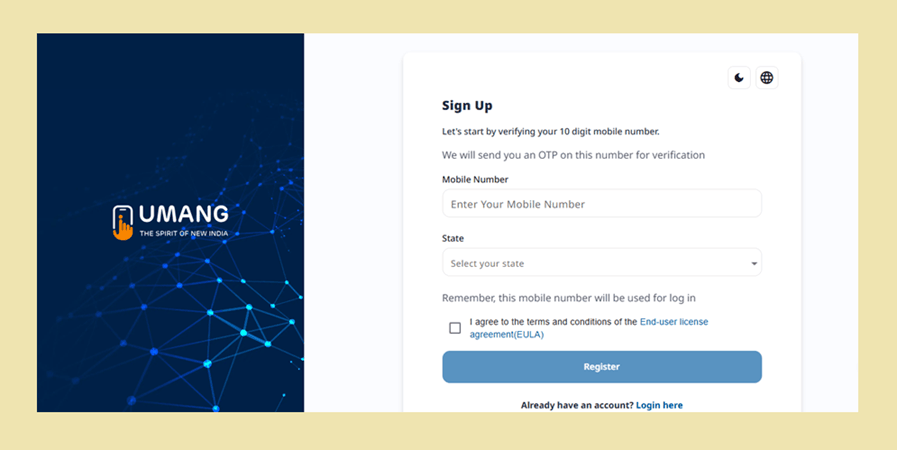
You do not need to visit a government office or fill out a paper form to create a UMANG account.
You can register through the official website or mobile application.
Official UMANG website: https://web.umang.gov.in/
Mobile app: Download UMANG from the Google Play Store or Apple App Store.
If you are using a computer, open the official website and select the Login/Register option. If you are using a smartphone, open the app and look for the registration option.
How to Complete UMANG New User Registration?
Let’s go through the registration process one step at a time.
Step 1: Open the UMANG app
First, install the official UMANG application on your smartphone. Open it and select your preferred language if prompted.
Step 2: Select New User Registration
On the welcome or login screen, look for the New User, Register or Signup option. Select it to start creating your account.
Step 3: Enter Your Mobile Number
Now enter your 10-digit mobile number. Make sure the number is active because you will receive an OTP for verification.
Step 4: Verify Your Mobile Number
Tap the option to generate an OTP. Enter the verification code received on your mobile phone and continue.
If you do not receive the OTP immediately, wait for a little while before requesting another one.
Step 5: Create Your MPIN
After successful mobile verification, you will be asked to create an MPIN.
An MPIN is a short security PIN used to access your UMANG account. Choose a PIN that you can remember but that other people cannot easily guess.
Step 6: Complete Additional Details
Depending on the registration flow, you may be asked to set security questions or provide additional profile information.
You may also get an option to link Aadhaar or complete other identity-related steps where required. Follow the instructions shown on the screen.
Step 7: Finish Registration
Check the information you have entered and submit it. Once registration is successful, you can access the UMANG home screen.
Your account is now ready to use.
How to Login to UMANG After Registration?
Once your new user registration is complete, you do not have to repeat the entire process every time you open the app.
You can log in using the available authentication methods.
- Open the UMANG application or official website.
- Select Login.
- Enter your registered mobile number.
- Choose the MPIN or OTP login option.
- Enter your MPIN or verify the OTP.
- Continue to your account dashboard.
UMANG also supports DigiLocker or MeriPehchaan-based login where available.
Keep your MPIN private. There is no need to share it with anyone to use government services.
What If You Forgot Your UMANG MPIN?
This is a common problem, especially for people who do not use the application regularly.
If you have forgotten your MPIN, visit the UMANG login screen and look for the Forgot MPIN option.
Follow the recovery instructions displayed on the screen. You may need to verify your registered mobile number through OTP or complete another available security check.
After setting a new MPIN, try logging in again.
Do not create another account just because you cannot remember your old MPIN. First try recovering access to your existing account.
What Services Can You Use After UMANG Registration?
This is where the app becomes useful. UMANG is not meant for just one particular scheme or department.
After registration, you can explore different services from the home page.
Some commonly searched service categories include:
| Service | What users can do |
|---|---|
| EPFO | Access available provident fund services |
| DigiLocker | Access supported digital documents |
| Aadhaar | Find available Aadhaar-related services |
| PAN | Access supported PAN-related services |
| Pension | Explore pension-related facilities |
| Government schemes | Find services offered by participating departments |
| State services | Access available services from different states |
| Utility services | Explore supported bill and other payment facilities |
Remember that some services require separate details such as UAN, PAN, Aadhaar verification or department-specific credentials. Simply creating a UMANG account does not automatically activate every government service.
How to Find a Particular Service on UMANG?
Suppose you want to check your EPF information. Instead of opening different websites, you can first search for the service inside UMANG.
Here is how:
- Log in to your UMANG account.
- Open the search option on the home screen.
- Enter the name of the service you are looking for.
- Select the relevant department or service.
- Read the instructions displayed on the page.
- Enter the additional details requested by that department.
You can also browse the available services by department or category.
My suggestion is to search using the exact service name. This makes it easier to find the relevant facility when several similar options appear.
Can I Register on UMANG Without Downloading the App?
Yes. You can also use the UMANG web portal through your computer or mobile browser.
Visit https://web.umang.gov.in/ and select Login/Register.
Follow the registration instructions displayed on the website. The available registration and authentication options may vary depending on the portal version.
This is useful if you do not want to install another application on your phone.
Why Is UMANG New User Registration Not Working?
Sometimes the registration process does not move forward even after entering the correct details.
Before contacting support, check these common problems.
| Registration problem | What you can do |
|---|---|
| OTP not received | Check your mobile network and number |
| Incorrect OTP | Enter the latest OTP received |
| MPIN not accepted | Follow the PIN requirements shown on screen |
| Registration page not opening | Refresh the page or try another browser |
| App not responding | Update the application and reopen it |
| Account already exists | Try logging in instead of registering again |
| Verification failure | Recheck your details and try again |
If you continue facing problems, use the official UMANG support facility.
UMANG Customer Care and Support
If you cannot complete registration or access your account, you can contact the official support team.
The current UMANG website provides a help facility and lists the following contact number:
UMANG Helpdesk: 10505
Official website: https://web.umang.gov.in/
You can also use the support and grievance options available on the portal.
Never share your OTP, MPIN or other confidential login information with anyone claiming to help you register.
Frequently Asked Questions
1. How can I complete UMANG new registration?
Open the UMANG app or official website, select New User Registration, enter your mobile number, verify it using OTP and create your MPIN. Complete the remaining details requested on the screen.
2. Is UMANG new user registration free?
Yes. Creating a UMANG account is free. You do not need to pay an agent or third party for registration.
3. Can I register on UMANG using my mobile number?
Yes. Mobile number registration with OTP verification is an available method of creating a new account.
4. Is Aadhaar compulsory for UMANG registration?
Aadhaar linking is not a universal requirement for creating a basic UMANG account using the mobile registration option. However, particular services may require Aadhaar verification.
5. How can I login to UMANG after registration?
Open the app, enter your registered mobile number and use the available MPIN or OTP login option.
6. Can I use UMANG on my computer?
Yes. Visit the official UMANG web portal and use its Login/Register facility.
7. What is MPIN in UMANG?
MPIN means Mobile Personal Identification Number. It is a security PIN used to access your account.
8. What should I do if I already have a UMANG account?
You do not need to register again. Simply use your existing mobile number and login credentials.
9. Can I use EPFO services through UMANG?
Yes. UMANG provides access to various EPFO services. Some facilities require your UAN and additional verification.
10. Which ministry operates UMANG?
UMANG is an initiative of the Ministry of Electronics and Information Technology (MeitY), developed through the National e-Governance Division.
Final Words
The UMANG app is useful when you regularly need different government services and do not want to search for every department separately.
Completing UMANG new user registration is a simple process. Keep your mobile number active, verify the OTP and create an MPIN that you can remember.
Once your account is ready, explore the services available on the home page. You may find that a facility you were previously searching for on a separate government website is already available through UMANG.
For registration and other account-related activities, always use the official website rather than an unknown third-party link.

Bala Subramanian Professional Content Writer having Experience in this field for the last 5 years. And he started his career as a content writer, and now he is working with many big news publications. His expertise in news, and interest in Tamil Nadu, Politics and Trending News.